Perusta sinäkin oma Blogaaja.fi blogi ilmaiseksi >>
Lainaa.com

Why an Eligible Transaction Can Still Miss an Automatic Receipt Batch

Introduction 

You open an invoice before the automatic receipt runs and everything looks right, yet the batch finishes without it. At Tech Leads IT, this is one of the first puzzles we use in Oracle Cloud Financials Online Training, because the receipt method matches, the paying customer is identified, a payment instrument is on file, and the dates sit inside the range, and the invoice still doesn’t get picked up. 

Selection doesn’t stop at those obvious checks. A later test Compares two configured minimums, and it can quietly drop a transaction that sailed through everything before it. That’s the kind of detail people learn to spot in Oracle Cloud Financials Training Online , where the goal is to look past the first Gates and find the one that actually made the decision. 

Start With the Batch That Actually Ran

Before you touch any setting, write down what the batch really used: the receipt method, currency, batch date, lead days, remittance bank account, and any customer, transaction, or document ranges. Then lay the missing invoice next to those values ​​and compare its receipt method, paying-customer details, payment instrument, due date, dispute status, and total.

The side-by-side view helps you avoid a common trap, which is Proving that an invoice looks collectible on its own without Proving it belongs in this specific run.

The receipt method is the first hard gate. A transaction has to use the same method as the batch. The paying customer and payment instrument also have to be present on the transaction itself, so check them there instead of assuming the customer account looks healthy. A tidy profile can sit right next to an incomplete transaction. If all three checks pass, note it and move on. They tell you the invoice is ready to be considered, not that it was selected.

What Oracle Cloud Financials Online Training Should Teach You About Timing and Disputes

Timing comes next. Lead days control how far ahead of the due date a transaction can enter selection. Swap vague thoughts like ”it’s due soon” for the real dates and the lead-days value the run used. It also helps to pull a couple of Neighbors with the same method and similar customer details, one just inside the date boundary and one just outside. Two records show the behavior far better than a single missing one.

Disputes are a separate gate. The customer or site profile has an option that decides whether items in dispute are included during selection. Record whether your invoice is disputed and which option is in force. If the invoice isn’t disputed, that option isn’t your answer. If it is, the setting might settle the question before the amount ever matters.

Whatever you find, resist the urge to clear the dispute or nudge the dates while you’re testing something else. Change one fact at a time, or you lose the ability to say what actually made the difference. And keep the submitted dates as they were, so a later rerun stays comparable.

Find the Minimum That Really Governs

Oracle’s documentation on how automatic receipts are processed points to a Minimum Receipt Amount on the customer or site profile and another on the remittance bank account. The process compares the two and uses the larger one. The transaction total must be greater than or equal to that larger value.

This test happens after the familiar details have already made the invoice look ready, which is exactly why the omission surprises people who only checked the method, customer, instrument, and dates.

Here’s a simple case. The invoice total is 475 in the batch currency. The customer profile minimum is 300, and the remittance bank account minimum is 500. The invoice clears the profile value, but that doesn’t matter. The governing minimum is 500, because it’s the larger of the two. A total of 475 fails and stays out of the batch. The earlier checks weren’t wasted, though. They led you to the later gate that made the call.

Now flip it: 500 on the profile and 300 on the bank account. Nothing changes, because the larger value is still 500. Neither location wins by default. Equality counts too. A total of exactly 500 meets the greater-than-or-equal condition, while 499 does not. A small comparison showing the transaction total, both minimums, the batch currency, and the governing value is usually all you need to confirm this, with no broad setup review required.

Check the Remittance Account Before You Blame the Invoice

The remittance bank account is what connects batch setup to the amount decision. One has to be defined for the batch’s receipt method in the batch currency, and its Minimum Receipt Amount supplies one side of the comparison.

So confirm which account the run used, confirm its currency, and read the minimum attached to it. Don’t swap in a familiar account from another currency or receipt method just because it’s the one you remember. And keep two situations apart: a valid account whose threshold excludes the invoice is a very different problem from a setup gap where no suitable account exists at all. They look similar from the outside, but they lead to different fixes.

Oracle Cloud Financials Training Online: Prove the Boundary With a Small Rerun

Once you know the larger minimum, test the boundary with a small, controlled set of transactions. Use one below both values, one above the lower value but under the higher one, one exactly equal to the higher value, and one above it. Hold everything else steady: receipt method, customer information, payment instrument, timing, dispute treatment, currency, and selection ranges.

The expected pattern is clean. The first two stay out, and the equal and above-minimum transactions come in.

This four-record run catches two common mistakes. The middle transaction exposes a review that only considered the smaller minimum. The equality case exposes anyone who reads the rule as strictly greater than. If your results differ from the pattern, go back to the recorded batch context instead of widening Ranges or editing unrelated fields. The goal is to identify which gate is in control, not simply to make the missing invoice show up on some later run.

Change Configuration Only With Business Sign-Off

A threshold isn’t just a technical setting. If the 500 minimum reflects an approved collection policy, then leaving out a 475 transaction is the correct outcome, and nothing needs fixing.

If the account owner decides 500 was entered by mistake, look at every process that uses that remittance account before changing it. A fix that helps one batch can quietly alter others.

After an approved correction, rerun with everything else unchanged. If the transaction enters only once the threshold changes, that’s strong evidence. A rerun that also shifts dates, dispute status, or customer payment details proves far less, because you can’t tell which change did the work.

Conclusion

Automatic receipt selection works as a sequence, not a single ”ready” label. Start by confirming the receipt method, paying customer, payment instrument, dates, ranges, dispute treatment, currency, and remittance account. Then compare the transaction total against both configured minimum receipt amounts, remembering that the larger minimum governs and equality qualifies.

A good exercise in Oracle Cloud Financials Online Training follows one invoice through those early Gates and then shows the amount test that comes after them. It’s also the habit that Oracle Cloud Financials Training Online builds best: when a transaction that looks ready still lands outside the batch, you can explain why with evidence instead of guesswork. 
 

A Stop Request Is Not Yet a Voided Supplier Payment

Introduction

A supplier says a payment never arrived. At Tech Leads IT, we teach teams that locating the payment, calling the bank, and logging a stop request still doesn’t make the payment void. Oracle Fusion Financials Training builds one habit here: pause and wait for the bank’s answer before touching anything.

That answer splits the case in two. If the bank confirms the stop, void the payment; if it says the payment cleared, cancel the stop-payment request. Oracle Fusion Financials Online Training and any solid Oracle Fusion Financials Course drill this fork until it feels automatic. Until then, stay at the fork. 

What Oracle Fusion Financials Training Teaches About a Supplier’s Report

Start with the supplier’s message, but be careful about what it actually tells you. ”I didn’t get it” describes the supplier’s experience. It doesn’t prove the payment is still unclear. It doesn’t prove the bank can still catch it. And it certainly doesn’t prove that voiding is the right call.

Think of the report like a smoke alarm. It tells you to go and look. It doesn’t tell you whether there’s a fire, how big it is, or whether the fire department can still do anything useful. Treat the report as a reason to investigate, nothing more. Pin down the exact payment first: which one, for how much, issued when. Only then contact the bank and place the stop order.

In practice, this means resisting the pressure that builds around a missing payment. Suppliers get anxious, managers ask for updates, and someone always suggests just voiding it and reissuing. Slowing down for a few minutes to confirm the facts is almost always cheaper than reversing a hasty decision.

Keep the Events in Order

Words matter more than people expect here. As the case develops, use precise verbs, because each one belongs to a specific person at a specific moment. The team requests a stop. The bank later confirms the stop or reports that the payment is cleared. The user then voids the payment or cancels the request. Those are separate acts, performed by different parties, and they happen in that order.

Sloppy language is where trouble starts. Say ”the payment was stopped” right after calling the bank and you’ve merged the request with its result. Say ”the payment was voided” and you’ve gone a step further, because voiding is an application action that only makes sense after the bank responds. A clean chronology keeps the whole team honest about where the case really stands, and anyone reading the notes later won’t have to guess what happened versus what was merely hoped for.

A good test: before writing any status note, check that the verb you chose describes something that has actually happened. If you can’t point to the event behind the word, the case probably isn’t ready for the next step.

Record the Request in Manage Payments, Not an Assumed Result

Oracle’s documentation page, ”What’s a stop payment request?”, explains that the record captures the dates on which a stop-payment order was placed with a financial institution or released from it. Once you’ve asked the bank to stop the payment, record that request through the Manage Payments task. The placed date tells you when the order was initiated. It does not certify that the bank intercepted anything, so the case stays open at the decision point until the institution replies.

Keep three things together: the identity of the payment, the date the order was placed, and the bank’s eventual communication. That small bundle of evidence lets another reviewer rebuild the sequence without guesswork. Which payment prompted the contact? When was the stop requested? What did the bank say? A supplier complaint sitting next to a void record can’t answer any of those questions. The bank’s response is the missing middle event, the thing that connects the original report to the correct branch.

Treat the record as a placeholder for a question, not an answer to it. It tells everyone that the team asked, and it timestamps the ask. The answer arrives later and from someone else.

Wait at the Fork

While the bank’s answer is pending, neither final branch is available. Having a request on file doesn’t prove the stop worked. A suspicion that the payment has already cleared doesn’t release the request either. The honest status is ”awaiting the bank’s response,” and the team should say so plainly to anyone who asks.

Waiting can feel uncomfortable, especially with a supplier asking for updates. Still, a clear message such as ”we’ve asked the bank to stop the payment and are waiting to hear back” is honest and far better than a premature promise.

This also protects you from contradictory records. Imagine treating the instrument as void internally while a colleague is still asking the bank whether it has already settled. Both can’t be true, and untangling them later costs far more than waiting a day or two.

A simple timeline makes the control easy to see: supplier report, payment identification, request to the bank, request recorded in Manage Payments, bank response, matching application action. The response always comes before the action. If a review turns up a void dated before the bank’s confirmation, the sequence is broken. If it finds a canceled request with no notice of clearance, someone chose the other branch without the fact that they should have decided it.

Branch One: The Bank Confirms the Stop

When the bank confirms that it stopped the payment, void the identified payment. That confirmation changes the case from an attempted intervention into a known stop. Keep the bank’s response with the request record, then complete the void action. Neither the supplier’s report nor the act of recording the request gave you permission to void. The bank’s confirmation is what makes this branch available.

The wording stays important even after you finish. The bank stopped the payment; the user voided it in the application. Holding on to both statements gives you a history that makes sense. It shows the outside event and the internal action that followed, in sequence. Months later, a reviewer can see exactly why the void happened and can tell the difference between the institution’s confirmation and the team’s response to it.

That distinction may sound fussy until an auditor asks for it. It also helps new team members learn the pattern just by reading past cases.

Branch Two: The Bank Reports Clearance

When the bank reports that the payment has already cleared, cancel the stop-payment request. Don’t void the cleared payment. The thing you cancel is the request you recorded earlier. The placed order stays in the history, while the release side shows that the stop request no longer governs the case. Clearance is the deciding fact here, just as confirmation of a stop was the deciding fact in the first branch.

The supplier may still be hunting for the money, and that’s a real concern. But it doesn’t change what happens to the stop request. The bank has said the payment cleared, so the matching action is canceling the request. Notice how little the supplier’s frustration alters the mechanics. Empathy belongs in the conversation; the application action still follows the bank’s word.

Keeping this fork narrow stops a service issue from bending the payment’s status. The team can then tell the story accurately: a stop was requested, the bank reported that the payment had cleared, and the recorded request was therefore canceled. The conversation with the supplier about where the funds went is a separate job, and it deserves its own follow-up.

Practice One Change at a Time in Oracle Fusion Financials Online Training

The best way to make this stick is to run two cases that open identically. In both, the same supplier reports nonreceipt, the same payment is identified, the bank receives a stop order, and the request is recorded through Manage Payments. Then change only one thing: the bank’s response. In the first case, the bank confirms a successful stop, and the payment is voided. In the second, the bank reports clearance, and the stop-payment request is canceled.

Side by side, the two cases expose any habit of treating the request itself as the outcome. Ask a reviewer to narrate each case using the verbs requested, recorded, stopped, cleared, voided , and canceled. Every verb has to land on the right actor at the right moment. The exercise works when no action shows up before its evidence and neither branch borrows the action that belongs to the other.

If you’re running a team session, keep the cases short enough to walk through in ten minutes, and rotate who narrates so everyone practices the verbs. That standard beats memorizing a long checklist. The whole control rests on one well-placed pause and one Verified response, and a pair of cases that differ by a single fact teaches it faster than any list of rules.

Conclusion: What an Oracle Fusion Financials Course Should Leave You With 

A supplier’s non-receipt report starts an inquiry, not a void. Identify the payment, ask the bank to stop it, record the request and place the date through Manage Payments, and then wait. If the bank confirms the stop, void the payment. If it says the payment cleared, cancel the stop-payment request.

Oracle Fusion Financials Training or a good Oracle Fusion Financials Course all make this stick by pairing cases that differ only in the bank’s response. Before touching any payment, ask what the bank has actually told you. That one question keeps your records clean and honest. 

What Are HCM Extracts in Oracle Fusion? Common Use Cases Explained

Introduction 

Every HR team eventually gets the same request: ”Can you send me a file with all active employees and their managers?” Soft Online Training sees this question come up in almost every Oracle Fusion HCM project, and the answer is usually an HCM Extract. Once you understand how extracts work, a lot of reporting and integration headaches become much easier to handle, which is why they are a core topic in any Oracle Fusion Technical Training in Chennai .

This guide explains what HCM Extracts are, how they work, and where they are used in real projects.

What Are HCM Extracts in Oracle Fusion?

HCM Extracts are a built-in Oracle Fusion tool for pulling data out of HCM and delivering it in a format that another system, vendor, or team can use. Think of it as a controlled way to say, ”Take this specific set of employee data, shape it like this, and send it there.”

You can output the data as XML, CSV, or other formats, and you can schedule the extract to run daily, weekly, or after a specific event. Unlike a one-time report, an extract is designed to run repeatedly and consistently. That is why companies rely on it for recurring data feeds.

It helps to separate extracts from the other tools people often confuse them with. HCM Data Loader brings data into Fusion. HCM Extracts send data out. Reports and dashboards are mostly for people to read on screen, while extracts are mostly for systems to consume.

How HCM Extracts Work Behind the Scenes

You don’t need to memorize every technical term on day one, but a few building blocks come up constantly.

Extract definition: The container for everything. You name it, choose its type, and decide how it runs.

User entities and database items: Fusion exposes HR data through predefined user entities, and their database items are the individual fields you can pull, like employee number, department, or hire date.

Blocks and records: Blocks organize data in layers, such as a parent block for worker details and a child block for assignments. Records decide which attributes appear in the output.

Delivery options: Send the data by email, secure file transfer, or Oracle’s content management area. 

Formatting: Use a BI Publisher template to turn raw XML into a clean CSV, a fixed-width file, or whatever layout the vendor needs.

Build it, run it, check the output, then schedule it. Most of the learning happens in that first test cycle, when you see what the data really looks like. 

Common Use Cases of HCM Extracts

This is where HCM Extracts really prove their worth. Here are the most common situations.

Payroll vendors: External providers need employee data in a fixed layout. An extract sends hires, terminations, salary changes, and bank details on schedule, with no manual file building.

Benefits carriers: Weekly or monthly feeds of enrollments, plan changes, and exits go straight to the carrier’s server.

Bank and compensation files: Salary and bonus data stays in the exact format these strict systems expect, run after run.

Analytics feeds: Send your data warehouse a full snapshot or only the latest changes.

Audit reporting: Answer who had access, who changed what, and who was active on a given date, the same way every time.

Directory and badge systems: Keep access, directory, and learning platforms in sync with HR records.

Changes-only extracts: Send just what changed since the last run, which keeps files small and protects good data downstream.

Why Oracle Fusion Technical Training in Chennai Should Cover HCM Extracts

If you’re planning a career in Oracle Fusion, extracts are a topic that separates people who have only seen the screens from people who have solved real problems. Employers want consultants who can turn a vague business request into a working feed.

Good Oracle Fusion Technical Training in Chennai should give you hands-on practice, not just slides. That means building an extract from scratch, adding blocks and records, formatting the output, and scheduling it. Ideally, you also troubleshoot a failed run, because that’s what the job really looks like.

Extracts also bring together HCM data knowledge, BI Publisher, and integration thinking. Learning them together makes you far more useful on a project. 

Practical Tips for Building Better Extracts

A few habits will save you time once you start building.

Start with the requirement, not the tool. Ask what fields the receiving system needs, in what format, and how often. Writing that down first prevents a lot of rework.

Keep it simple at first. Build a small extract with a handful of fields, confirm it works, and then add more. Debugging a huge extract is much harder than growing a small one.

Test with realistic data. An extract that looks fine for three employees can behave very differently for three thousand. Check edge cases such as terminated workers, people with multiple assignments, and missing values.

Think about security. HR data is sensitive. Make sure only the right people can run the extract and that the delivery location is secure.

Document what you build. Six months from now, someone will ask why a field is formatted a certain way. A short note now saves a long investigation later.

Skills to Build Alongside Oracle Fusion Technical Training in Chennai

If extracts are your goal, it helps to strengthen a few related areas at the same time. A basic understanding of HCM data structures makes it easier to know which database items to pick. Comfort with BI Publisher helps when the output has to match a vendor’s exact layout. Some familiarity with XML, since it is the default output, makes reading and fixing files far less painful. And a general sense of how integrations work helps you plan delivery, scheduling, and error handling.

None of this is out of reach for a beginner. It simply builds step by step, and each piece makes the next one easier.

Conclusion

HCM Extracts are one of the most practical tools in Oracle Fusion HCM. They take the data your organization already maintains and send it to the people and systems that need it, on a schedule, in the right format, without manual effort. From Payroll and benefits to audits and analytics feeds, the use cases are everywhere.

If you want to learn how to build and manage them with real examples and guidance, Soft Online Training offers the hands-on approach that makes these concepts click, especially through its Oracle Fusion Technical Training in Chennai . Start with a small extract, test it carefully, and build from there. That is how most Consultants get comfortable, and it is a skill that will keep paying off throughout your Oracle Fusion career. 


A Failed Funds Reservation Has Two Sides: The Transaction and the Budget

Introduction

A requisition line asks for funds to buy laboratory equipment, and the reservation fails. At Soft Online Training, we use this scenario in our Oracle Fusion Financials Training in Chennai sessions because it trips up almost everyone. The requester sees a shortfall and assumes the annual budget is gone.

The budget manager knows better. The same account still has money in a future period, while another open commitment eats into the current balance. The transaction view shows how the line was validated, and the budget view shows where it sits among balances and other activities. Neither tells the whole story alone.

Start Every Funds Check Result by Naming the Transaction

Before anyone guesses at a cause, pin down which transaction produced the result. The results window only applies to transactions that have been checked or reserved, so a status means little without its context. Read the requested amount, consumed amount, control budget, account, period, and funds status together. They show where the line was evaluated, but they can’t tell you why it failed. That could be a wrong account, competing consumption, or a real shortfall.

Take a snapshot straight away: transaction number, line, requested amount, account, budget date, control budget, period, the action you ran, and the time of the result. Balances shift as other transactions reserve or liquidate funds, so don’t keep rerunning the check. A later pass might just mean someone else’s money moved. When several departments draw on one controlled budget, the order of events is evidence, and it is worth keeping.

Use the Transaction View in Oracle Fusion Financials Training in Chennai Scenarios

The transaction view is the default, and anyone who can access the transaction can open it. It shows the control budget, budget period, account, and the requested and consumed amounts. Begin here to confirm the line Landed on the budget and period you expected. A healthy annual total won’t rescue a line charged to the wrong account or dated into a period with different controls. So the first question isn’t ”how much is left?” It is ”which budget dimensions did this line actually use?”

The 26D documentation on budgetary control results describes this view as the place to understand a transaction’s validation impact. For the lab purchase, compare requests against consumed and read the funds status line by line. If there are several distributions, resist the urge to explain them all at once. One may pass while another fails because it resolves to a different account or period. Fix the failing distribution and leave the valid accounting on the others alone.

Let the Budget View Explain Availability

The budget view flips the perspective from one transaction to the budget it affects. It can show balances, funds statuses, related transaction lines, and availability in current and future periods. Access depends on the Review Budget Impact privilege, and control budget data security still applies. If a requester can’t open it, the budget manager may need to investigate. That separation is by design and doesn’t mean the result is incomplete. Share the conclusion through the approved process rather than widening access for one case.

Read available funds next to the amounts that explain consumption. The documented categories include commitments, obligations, payables expenditures, receipt expenditures, project expenditures, other expenditures, other encumbrances, and other anticipated expenditures. A requisition can add to commitment, while a purchase order can hold obligation until fulfillment or liquidation changes its effect. The budget manager’s job is to find which category is creating the pressure and then drill into the transaction behind it. ”Not enough budget” is a conclusion. ”An open purchase order still consumes obligation in this period” is a diagnosis.

Treat Additional Required as a Gap in Your Oracle Fusion Financials Training in Chennai Practice

The additional required amount tells you how much more funding the transaction needs once current availability and consumption are counted. It measures the gap. It doesn’t tell you how to close it. The options are quite different: correct an account or date entered in error, close a genuinely obsolete commitment through its proper process, request a budget adjustment, shrink the purchase, or put it off. Each has a different owner and a different accounting consequence, so the number should start a decision rather than quietly make one.

Future-period capacity needs the same care. Seeing room next quarter doesn’t entitle anyone to move the budget date. Delivery timing, accounting policy, the procurement schedule, and control budget rules decide the right period. Shifting a date just to get a green status can misstate when the obligation belongs. For the equipment, confirm the expected delivery and your organization’s budget policy first. If the need truly falls later, document it. If it belongs now, go through budget governance for current-period funding.

Reconcile After the Fix and Build the Habit Through Oracle Fusion Financials Training in Chennai

Once the authorized correction or budget action is done, run the validation again and compare it with your saved baseline. Check the same lines, control budget, account, period, requested amount, resulting consumed amount, and funds status. Then open the budget view and see whether the balances and related activities agree with what the transaction now says. Also look for other lines that changed unexpectedly. A good status without that dimensional check can hide a pass that was achieved by pushing the charge into the wrong budget segment.

A simple practice drill works well here. Give learners four pieces of evidence: a failed requisition distribution, a current-period balance, a future-period balance, and an old purchase order obligation. Ask them to separate facts from proposed remedies. Then reveal that the old order is still valid and the requisition account contains a data-entry error. The right answer is not to close the order or move the date. It is to correct the account and reserve again. The drill checks whether learners follow the transaction’s dimensions before reaching for funds that merely look available.

Conclusion

A failed funds reservation gets much easier to handle once you read both layers of evidence. The transaction view shows the control budget, account, period, request, consumption, and the exact line behind the result. The budget view adds the bigger picture: surrounding balances, consumption categories, related activity, and future-period context for authorized users.

Keep the original result, route the remedy to the right owner, and reconcile the dimensions after you validate again. A good exercise in Oracle Fusion Financials Training in Chennai teaches more than how to clear a failure. It teaches you not to fix the budget while leaving the transaction wrong. 

Moving Cash Between Receipts Without Losing the Accounting Trail

Introduction 

A customer pays twice in the same currency, then sends a remittance advice that swaps the amounts. For Tech Leads IT learners, this makes a useful case in Oracle Cloud Financials Online Training. One receipt holds excess unapplied cash, while the other cannot fully settle its invoice. Since the bank confirmed both deposits, reversing and recreating them would muddy a clean history.

Receipt-to-receipt application moves available funds between open Receipts while keeping source, target, and invoice clearly separate. Oracle Cloud Financials Training Online should stress its controls, because done carelessly, it creates a second mess on top of the first. 

Start With the Business Error, Not the Desired Balance

Before anyone opens a screen, work out what really went wrong. Gather the bank amounts, receipt numbers, customer account, receipt dates, currencies, and the customer’s original remittance instructions. Then check whether the excess sits as unapplied cash or on-account cash, because those are the balances that can be moved. Having a balance available doesn’t mean moving it is the right call, though. Whoever makes the entry should be able to say, in plain words, why the money belongs with the target receipt and why both bank receipts are still valid. That explanation is what separates fixing a misread allocation from tidying up an aging report.

In our example, the bank confirms both deposits, and only the split between them is wrong. So the evidence packet needs the remittance advice, both receipt identities, the amount to move, and the invoice the cash is meant to settle. It also helps to note who approved the correction and when, so the reviewer doesn’t have to chase that later.

If the customer, the legal owner of the funds, or the currency is in doubt, stop and investigate. Receipt netting isn’t a way to identify unknown cash, settle a dispute, or repair a receipt created against the wrong bank event. A clear problem statement keeps the adjustment small.

What Oracle Cloud Financials Online Training Should Cover Before You Move Funds

The rules here are specific. Both Receipts must be open and in the same currency, and the source needs unused or on-account cash to give. Receivables also needs a clearing account defined under the Payment Netting receivables activity. That account carries the offset as value leaves one receipt and arrives at the other. Before you process anything, confirm the activity setup and the accounting date the application will use. A transfer that fixes the customer’s balance but lands in the wrong period just swaps one problem for another.

I’d keep these checks together in one place so nobody has to hunt for them mid-correction: open status on both receipts, matching currency, available source balance, the netting activity account, and the accounting date.

Oracle’s 26D guidance on receipt-to-receipt applications also flags the same-currency requirement and the chance of an exchange gain or loss when that shared currency is foreign to the ledger. Same currency doesn’t mean no currency effect. If the two receipts carry different conversion rates, the target receipt can pick up a realized difference when the application happens. Note both rates and estimate the expected effect before entry, especially near period end, so the reviewer isn’t surprised by a gain or loss after accounting is created.

Read the Accounting as a Bridge

Think of the accounting as a bridge between two receipts. On the source side, unapplied cash goes down and the movement is offset through payment netting. On the target side, payment netting is used to raise unapplied cash. The cash account isn’t swapped for a different bank receipt. The application simply reallocates available value through the configured clearing mechanism.

That’s why the two receipts have to be reviewed together. Look only at the target and the new available amount seems to come from nowhere. Look only at the source and the cash seems to have vanished. A useful habit is to keep both receipt histories open side by side while you check.

Reconcile the bridge in three views:

  1. On the source receipt, confirm the available balance dropped by the approved transfer.
  2. On the target receipt, confirm available funds rose by the same entered amount.
  3. In accounting, confirm the payment-netting entries offset each other and that any foreign-currency effect belongs to the target receipt.

Only then apply the target balance to the intended invoice. Keeping the transfer and the invoice application as two separate checkpoints makes a wrong amount much easier to find and reverse.

Treat Rate Changes as a Recalculation Event

Say someone later corrects a conversion rate. Don’t just glance at the edited receipt. The documentation says accounting is rederived using the adjusted rate, so build your review around the resulting accounted amounts and exchange gain or loss rather than around an assumed rollback sequence. A rate edit after netting isn’t cosmetic. Before changing it, identify the affected period, the posted status, the paired receipt evidence, and any reconciliation work that may need refreshing.

For a period-end case, a before-and-after schedule helps. Capture entered amounts, conversion rates, accounted amounts, application date, and netting-account impact for each receipt. Once accounting has been rederived, compare all five items instead of checking only the revised gain or loss. Treat that schedule as part of the audit file, not a scratch note.

Let the resulting entries show which receipt records were affected, and don’t assume the system rebuilt both histories in any particular way. If the change touches a closed period or the outcome is unclear, send it through your organization’s accounting review. The product decides the result. Period policy decides who can authorize it.

Designing Oracle Cloud Financials Training Online Exercises Around the Unapply Test

An application can be unapplied as long as doing so doesn’t push either receipt negative. That condition is easy to forget once the target funds have moved on to an invoice. A team that needs to unwind the netting may first have to unapply the downstream invoice application so the target has enough available balance again. Map that dependency during the original review: source receipt, target receipt, the later debit item, and every accounting date. With the map in hand, a reversal becomes a controlled sequence instead of improvisation.

A good practice set covers a partial transfer, a full transfer, two foreign-currency receipts with different conversion rates, and an attempted unapply after the target has been used. Run these in a test environment, and for each case ask learners to predict the balances and accounting before they process anything. Then compare the Prediction with the actual receipt histories and entries.

The skill that matters isn’t remembering where to click. It’s recognizing which balance supplies the funds, which one receives them, where the clearing account sits, and what later action can make reversal unavailable.

Conclusion

Receipt-to-receipt application answers a precise allocation problem, so use it only after you’ve proven that both bank Receipts are valid, both are open in the same currency, the source has available cash, and payment netting is configured. Review the paired receipt histories, the clearing entries, the accounting date, and any realized currency effect before applying the target receipt to an invoice. 

Keep the reversal sequence with the rest of the evidence. In any Oracle Cloud Financials Online Training exercise, that end-to-end trail shows why moving the value is only half the job. Explaining where it came from, and how it can be unwound, is what completes the control.


An Invoice Validation Hold Is a Diagnosis, Not a Dead End

Introduction

A supplier invoice bills six units, but receiving shows only five. At Tech Leads IT, we use this exact case in our Oracle Fusion Financials Training because it shows why a matching hold is a clue, not a dead end. The invoice was keyed correctly and matched to the purchase order, yet payment is blocked.

So the question isn’t how to remove the hold. It’s whether the sixth unit was never recorded, never delivered, or billed by mistake. That habit of checking evidence first is what we teach in our Oracle Fusion Financials Online Training and every Oracle Fusion Financials Course session. 

What Validation Really Checks in Oracle Fusion Financials Training

In any solid Oracle Fusion Financials Training program, one of the first things to get across is that validation is not a single ”is this invoice complete” flag. It is a bundle of checks and calculations. It can build distributions from line information and allocations, calculate tax, create tax lines and distributions, work out withholding, and even create withholding invoices. It also looks at matching variances, project information, conversion rates , and period status. Where budgetary control applies, it reserves funds and can place holds for insufficient funds or other validation errors.

That is why a failed result needs sorting before anyone fixes anything. Several independent conditions can sit on the same invoice at once, and the one you see first may not be the only one.

Treat the invoice, purchase order, receipt, and validation result as one body of evidence. Write down the affected invoice line and distribution, the hold name and its reason, the values ​​being compared, the Tolerance in force, and whether accounting is allowed while the hold remains. Don’t guess the remedy from the word ”hold” alone. Some holds can be released manually. Others need the underlying exception corrected and another validation run. Good evidence points to the failing condition and to whoever owns the fix.

Tracing the Six-versus-Five Gap Back to Its Owner

Start with what physically happened. If all six units arrived and the receiving team recorded only five, the receipt is incomplete. The receiving owner should confirm the delivery and record the remaining unit under the organization’s procedure. Once the invoice is validated again, the billed and received quantities can line up, and the hold Clears on its own.

If only five units arrived, things look very different. Adding a sixth receipt would manufacture evidence, and that creates a bigger problem than the hold ever did. Procurement may need to chase the delivery, while Payables keeps the invoice away from payment until the gap is resolved or an authorized alternative is chosen.

Then there’s the third possibility: the supplier simply billed one unit too many. Here the correction belongs on the commercial side, not in receiving or in Payables. The examples in Oracle Financials 26D: How Invoices Are Validated show this clearly. A quantity mismatch is resolved when the remaining goods are received, and a price mismatch is resolved through a supplier credit and a price correction. Both examples point to the same reusable principle: change the record that is wrong, then resubmit validation.

Notice what that principle rules out. Nobody should release a hold just because a receipt or credit is expected to show up later. Expectation is not the condition being tested. Validation looks at what the records say today, and your response should be grounded in the same thing.

Corrective Release vs Manual Release: A Lesson for Oracle Fusion Financials Online Training

If you are building a module for Oracle Fusion Financials Online Training, spend real time on the difference between a corrective release and a manual release, because learners often blur them together. A corrective release happens when the underlying exception no longer exists and validation removes the hold itself. A manual release is an explicit decision, available only for eligible holds. Someone with authority chooses to proceed despite the exception, or uses a permitted release path.

The difference matters for accountability. A corrective release says the transaction now passes the configured rule. A manual release says a person accepted the exception. When you release manually, capture the reason, the user, the date, the supporting approval, and the effect on payment and accounting. Without that trail, a later reviewer can’t tell whether the data changed or a judgment call overrode the block.

It also helps to resist generalizing from one hold to the next. An account problem, a matching variance, and a distribution variance point to different data and need different corrections. The validation guidance makes clear that invoices are validated before payment or accounting, and that matching can place holds. Use those as common starting rules, then look at each active hold, its reason, and its available release path. Don’t assign a payment or accounting effect from the label alone. And remember that clearing the first visible exception can expose a second one that was there all along.

Why Tolerance Changes Are Policy Changes

Adjusting a tolerance can make an invoice pass without touching the purchase order, the receipt, or the invoice itself. That makes tolerance maintenance powerful, and a little risky. Before changing any threshold, work out who and what it will affect, the business reason, when it takes effect, who has the authority to approve it, and whether the new level still fits procurement policy. A tolerance should express a variance the business has agreed to accept. It should never be a convenient detour around one stubborn invoice.

Test the change on a mix of representative low-value and high-value invoices before relying on it in production. A setting that behaves sensibly on a small consumable order can behave very differently on an expensive one.

For our six-unit invoice, compare the percentage and the amount. One unit may look small as a count but significant as a value. Check whether the purchase order is quantity-based or amount-based, and which measure validation is actually testing. Also keep a record of the tolerance values that applied when the validation result was produced. If configuration changes later, your historical evidence should still explain why this invoice was held or released under the earlier boundary.

Revalidating and Proving the Outcome in an Oracle Fusion Financials Course

Any well-designed Oracle Fusion Financials Course should end its invoice-hold lesson with proof, not just a fix. After the correction, run the appropriate validation action or process and then read what it produced. Confirm that the intended invoice was included. Confirm that the original hold is gone and no new hold has appeared. Check that distributions are still complete, and that payment and accounting statuses agree with the result.

If tax, withholding, or distributions were regenerated, compare the financial totals against the supplier document and the approval. Regeneration can quietly change numbers, and you want to catch that before the invoice reaches payment.

One more habit is worth building. A successful process status proves that the process finished. It does not prove that every invoice passed every check. Learners who treat ”completed” as ”approved” will eventually let a problem invoice through, so it is better to teach them to open the results and look.

A Short Drill That Teaches Invoice Control

A simple exercise can lock all of this in. Build three variants of the same mismatch and give them to your participants.

In the first, the sixth unit arrived but was never received. In the second, the sixth unit never arrived at all. In the third, the supplier should have billed for five units. For each variant, ask participants to name the evidence owner, the object that needs correcting, the permissible release route, and the proof they would collect after validation.

Their answers should differ, and that is the whole point. The first points to receiving, the second to procurement and the supplier, and the third to a credit or corrected invoice. If every scenario ends in a manual release, the exercise has trained people to clear statuses instead of controlling invoices. Watching a group realize that the same hold can have three different owners is usually the moment the lesson lands.

Conclusion

Validation turns invoice data and Purchasing evidence into a controlled decision about payment and accounting. When the billed quantity runs ahead of the received quantity, find out what physically happened first, fix whichever receipt or commercial document is wrong, and validate again. Use manual release only when it’s available, authorized, and properly backed up. Before you call the invoice ready, recheck every hold and any regenerated financial details.

That is why Tech Leads IT builds this six-versus-five mismatch into its Oracle Fusion Financials Training. The same case can end three different ways, and it works just as well in Oracle Fusion Financials Online Training or an Oracle Fusion Financials Course . The lesson sticks either way: fix the condition the hold is pointing to, not the hold itself. 


HCM Data Loader vs FBDI: What Is the Difference?

Introduction

Sooner or later, every Oracle Fusion project hits the same awkward moment. Someone from the business walks over with a Spreadsheet of ten thousand rows and asks how quickly you can get it into the system. Learners in Soft Online Training’s Oracle Fusion Technical Training in Bangalore program tell us this is exactly where they freeze, because Oracle gives you two bulk loading tools and it isn’t obvious which one to pick. They are HCM Data Loader (HDL) and File Based Data Import (FBDI), and grabbing the wrong one can eat a whole afternoon.

So Let’s sort out the difference in plain language.

What HCM Data Loader Actually Does

HDL is the tool for people data. Workers, assignments, salaries, absences, jobs, grades, positions, departments. If a record belongs to the HR side of Fusion, HDL is almost always how it gets loaded in bulk.

You build pipe-delimited .dat files, zip them, and upload the package. Every file is tied to a business object, and the first line of each block is a METADATA row that tells HDL which columns are coming. It looks odd the first time you see it, honestly. Give it a few loads and it starts to feel natural.

What makes HDL Handy is that one file format covers a lot of ground. You can hire a worker, change one assignment, or end-date a record using the same approach. HDL also understands date-effective data, which matters because HR records change over time, and nobody wants to lose that history during a migration.

What FBDI Actually Does 

FBDI covers the money and materials side: Financials, Supply Chain and Procurement . Think payables, invoices, journals, fixed assets, suppliers, customers, purchase orders and receipts.

The process is simple enough. You download an Excel template, fill in your data, and generate a zip of CSV files. Upload it to Universal Content Management, run ”Load Interface File for Import,” then the object’s import job, like Import Payables Invoices. The key step is the middle one: data lands in interface tables first, not live transactions. Bad rows stay behind with errors, so you can fix them without polluting anything real. It’s a safety net you’ll appreciate the first time a load fails.

The Real Differences Between HDL and FBDI

The fastest split is by module: HDL for HCM, FBDI for Financials and SCM. A few other differences catch people off guard, though.

The file format is the obvious one. HDL wants .dat files with METADATA and MERGE lines, while FBDI gives you a Spreadsheet template and builds the CSVs for you. Beginners usually find FBDI easier on day one, but HDL’s specifications give you more room once you’re comfortable.

HDL pushes records straight into the application. FBDI stages them in interface tables first, then needs a separate import job.

Updates also differ. MERGE lets HDL decide between new and existing records, while FBDI mainly inserts new data.

Finally, HDL’s load report names the exact failing line, while FBDI means checking interface errors, fixing rows and rerunning. 

How to Choose Without Overthinking It

Ask one question: whose data is this?

If it’s about people, such as new hires, salary changes or bulk updates to locations, use HDL. Nobody loads employees through FBDI.

If it’s about money or materials, like opening payables invoices, supplier records or fixed assets, use FBDI.

Picture a company moving off a legacy system. The HR team loads four thousand employees with their managers and assignments through HDL. The finance team loads twelve thousand open invoices and six hundred suppliers through FBDI. Same project, same go-live weekend, two tools running side by side.

Some objects sit in a gray area, and a few setup items can be loaded more than one way. When you aren’t sure, check Oracle’s supported object list before you build anything. Ten minutes of reading beats rebuilding a file you spent two hours on.

Why Oracle Fusion Technical Training in Bangalore Treats Both Tools as Must-Know

If you want to work as a technical consultant, you won’t get to pick a favorite. Real projects need both, sometimes in the same week. That’s a big reason Oracle Fusion Technical Training in Bangalore spends so much time on data migration. It’s usually one of the first things a new consultant gets tested on.

Bangalore has a huge number of Oracle projects going on at once, from global capability centers to implementation partners, so employers expect new people to already know how loading works. Reading about it isn’t enough. You need to have built a .dat file, watched it fail because of a wrong date format, and fixed it. You need to have filled in an FBDI template, uploaded the zip, and gone digging through an interface error at the end of a long day. That kind of repetition is what makes the tools feel ordinary.

Mistakes Beginners Make Again and Again

Most loading headaches come from the same few habits.

People start filling in the template before mapping their legacy fields to the Oracle fields. Even a rough mapping sheet saves you hours later.

They load everything in one go. Try ten or twenty rows first. If those go through, scale up. If they don’t, you’ve learned something cheaply.

They forget about dependencies. Jobs and locations have to exist before workers can point to them. Suppliers have to exist before their invoices can load. The order matters as much as the format.

And they trust a ”success” status too fast. Open the output reports, then check a handful of records in the application itself.

Learning HDL and FBDI Step by Step Through Oracle Fusion Technical Training in Bangalore

If you’re starting from zero, here’s a path that works. First, understand what a worker record or an invoice really means in business terms, before you touch a file. Then practice FBDI with something simple like suppliers or journals. After that, try a basic worker load with HDL. Once you’re comfortable, move on to updates, error correction and bigger volumes.

Alongside this, pick up some BI Publisher, OTBI and REST API basics, since technical consultants get asked about reporting and integration too. A structured program with a proper lab environment helps a lot here, mainly because you need somewhere to break things safely. That’s hard to set up on your own.

Conclusion 

HDL and FBDI do the same basic job of moving large volumes of data into Oracle Fusion, but they belong to different parts of the application. HDL is for HCM and people data, and it copes well with updates and history. FBDI is for Financials and Supply Chain transactions, with a useful staging step before anything goes live. Choose by module first, check the supported objects, and always test a small batch before the big one. That habit is one of the first things you pick up in Oracle Fusion Technical Training in Bangalore , and it will save you plenty of rework on real projects. 


Why Can a Clean Import Still Leave a Freight Charge Unlinked?

Introduction

Here’s a situation that catches people out. At Soft Online Training, we often see learners load a batch of freight invoices, including ocean freight for forty containers, and watch the import finish with no rejections. Accounting moves on and everyone relaxes. Nothing looks wrong on the screen. A few days later, the cost asks why one charge isn’t showing against the shipment.

The reason is tiny: one line carries a charge name that doesn’t exist. If you’re doing Oracle Fusion Financials Training in Bangalore , this is a good case to understand early, because ”imported fine” and ”fully linked” are not the same thing. 

Two Outcomes in One Import: Where Oracle Fusion Financials Training in Bangalore Should Start

Creating the invoice and linking the charge are two separate jobs, each with its own checks. The invoice line creates the payable. The association then connects that line to a Landed cost charge. So a good invoice can sit beside a failed link.

That’s deliberate, because one bad reference shouldn’t stall a hundred good invoices. But someone still has to check. If your team only watches rejected invoices, the ones with a missing costing link will never come up.

Before loading, decide what each freight line should look like: charge name, reference details, target line. Then ask two questions per line: did the invoice import , and did the charge attach? Until both are answered, or someone owns the exception, the batch isn’t done. 

Build the Invoice Line and Its Charge Row From the Same Source

The 26D release adds a charge-reference sheet to the usual Payables invoice import workbook. On a line marked as landed-cost enabled, the extra row can hold the charge name, reference type name, reference value, comments, and a landed cost line number if you need one. Invoice identifier, invoice line number and charge name are required, and those three are what tie the row to its parent.

I’d build both sets of rows from a single source. Pull them from separate extracts and join them later, and sooner or later a line number slips by one. You get a nicely filled row pointing at the wrong invoice line, and nobody spots it until reconciliation. Check charge names against approved master data before you create the file. Keep leading zeros on identifiers. Validate reference values ​​by type, and remember that dates need year-month-day. And don’t trust what Excel displays; check the value that actually got exported.

What the Import Actually Starts

When the invoice import runs, it picks up any populated charge-reference records, and a background job tries to link them to the invoice lines. The first process finishing says nothing about the second, so keep the process IDs and output for both.

If something looks off, work in order: confirm the invoice and line exist under the expected identifiers, then check whether the association job linked the child row or logged an error.

The landed-cost-enabled flag works like a gate. Leave it off and the charge row is ignored, however well it’s filled in. An enabled line with no charge record imports and can be linked later. Different problems, so don’t label both ”link missing,” or people will check the wrong thing. 

Fixing the Bad Charge Name Without Touching the Invoice

For the failed ocean freight line, compare the submitted charge name with the configured one, exactly as your setup defines it. Then check the required keys, whether the parent line is enabled, the reference type, the reference value and the target line. Validation errors land in the landed cost interface while the rest of the batch imports as normal, so start there and in the process output. Please don’t delete a legitimate payable just because its costing link is incomplete.

Then decide what kind of defect you’re looking at. A typo in the charge name is a source-data problem. A valid new charge that isn’t in the target environment is a setup or migration problem. A bad date is a transformation problem. A wrong line number is a relationship problem. That tells you who owns the fix, and it stops the team reloading the same bad file three times.

Reconcile by Line, Not by Total

Batch totals can match to the cent while associations quietly fail. Reconcile on invoice identifier, line number and charge name instead, adding reference details when they separate several targets. Count what you expected, what linked, what failed and what you left out on purpose, and put a reason against every gap. In the forty-container batch, that one failed line should stay visible even though the invoice count and value match the source.

Watch for duplicates too. If the source sends the same charge reference twice, catch it before import or find out how the system reacts. If an invoice line truly needs several landed cost charges, each child row needs a clear business reason. And don’t depend on the amount alone, since freight and insurance can easily share a value while being different costs.

A Test Pack for Anyone Doing Oracle Fusion Financials Training in Bangalore

Start with one valid enabled line and a valid charge, then break one thing at a time. Try a missing invoice identifier, a missing line number, a bad charge name, a disabled parent line, a malformed date, no optional fields, the wrong target line, a duplicate child row, and an enabled line with no association row. Put two invoices in the same batch so you can watch one association fail while the other succeeds.

For every case, write down what should happen at both layers. Does the invoice import? Does the job pick up the child row? Is a link created, where does the error go, and do the other invoices carry on? Test access as well. The association job runs under the existing invoice-import privilege, not a separate one, so use that security context. Last, rerun the corrected cases and confirm the fix didn’t create Duplicate invoices or links. A clean retest closes the exception. A ”completed” status doesn’t.

Conclusion 

An imported freight invoice and a linked Landed cost charge are two separate facts, and each needs its own proof. Build the invoice line and charge row together, switch Landed cost on, check the charge and reference data, keep both process outputs, and Reconcile line by line. When one link fails, read the interface error, leave the valid payable alone, and retest until the link is complete and not doubled up. Good Oracle Fusion Financials Training in Bangalore makes this feel routine, so nobody treats invoice success as the finish line. 

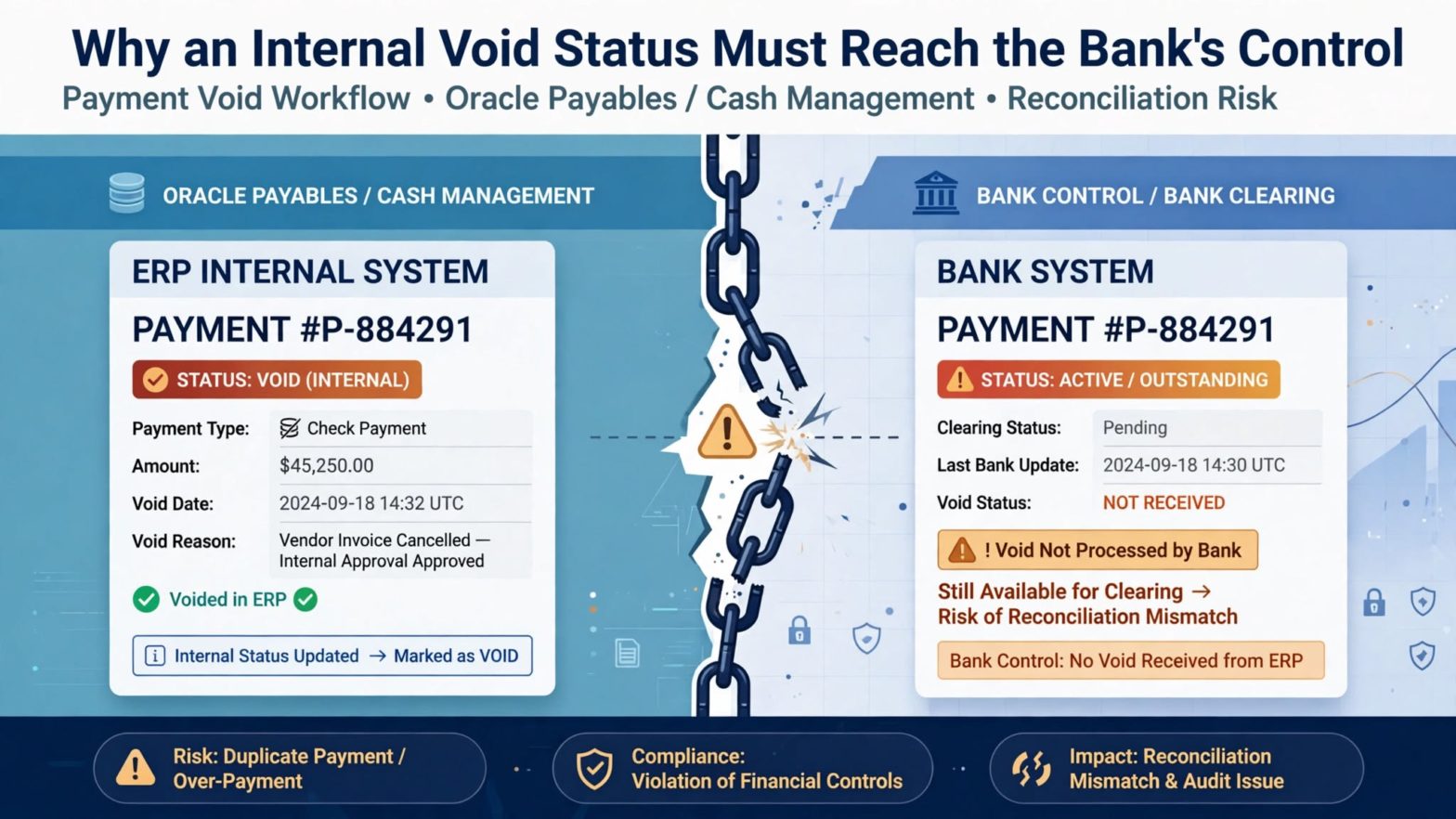
Why an Internal Void Status Must Reach the Bank’s Control

Introduction 

Say a check goes out on Monday and sits in the positive pay issue file. At Tech Leads IT, we use this scenario in Oracle Cloud Financials Online Training because it shows how easily two systems drift apart. On Tuesday, someone learns the envelope never arrived, so the payment is voided.

The bank hasn’t moved on, though. Unless it receives the void through the agreed channel, its records still treat that check number, amount, and payee as good to pay. That’s why we walk through it in Oracle Cloud Financials Training Online : the same check is dead on your side and alive on theirs. 

Two Records, One Check

Your system tracks the payment for accounting and status. The bank keeps its own list to screen checks when they’re presented. When a check is issued, both lists should say it’s good. When it’s voided, both should say it isn’t.

The risk is the gap between those two moments. If someone finds the lost envelope, or copies the check, and presents it while the bank still has the original issue on file, the bank has every reason to honor it. You’d catch it in reconciliation eventually, but by then the money’s gone. Positive pay is meant to stop that, not help you explain it afterwards.

I find it easiest to picture the check’s life as pairs of steps. It’s created, issued, sent, and acknowledged. Then it’s voided internally, the void is sent, and the void is acknowledged. Banks don’t all send back the same amount of detail, so you have to decide with yours what counts as proof that the message arrived.

A generated file alone doesn’t prove much. You want the process output, a record of who handed it off, the bank’s receipt or Portal status if there is one, and a reconciliation showing no voids were left out or sent twice.

Choosing a Void-Only Population in Oracle Cloud Financials Online Training

Oracle added 26D support for ISO 20022 positive pay files carrying voided-check details, described in Oracle Financials 26D: ISO Positive Pay File for Voided Checks. It covers JPMorgan Chase and PNC, not Bank of America, so if your checks go through them, this won’t help yet.

Someone runs it by hand. They start Create Positive Pay File, choose the predefined positive pay payment process profile, enter the payment file number, and set Select Status to Voided Payments Only. That keeps cancellations apart from normal issue reporting, and the payment file number ties the message to the original file and builds the message ID.

For the lost envelope, confirm the JPMorgan Chase or PNC profile has its ISO format assigned, pick the payment file number tied to the voided payment, submit, and read the output before it leaves.

Don’t treat these choices as routine. A wrong payment file number points the void at the wrong checks and changes the message ID. Next month’s operator should get the same result, and a reviewer should agree.

Reconciling the File Back to the Source Checks

You want to count at three points. Start with the list of voided checks that belong in this run. Next, compare their count and total to the file or process report. Then compare what you actually sent to what the bank says it received.

Don’t lean on the total alone. A missing record and a duplicate can cancel each other out and leave the amount looking perfect. So check the details too: the check number, account, amount, currency if it matters, issue date, and void status, following whatever rules your bank’s setup uses.

Keep the void tied to the original issue. Voiding doesn’t erase the fact that the check was issued. Someone reviewing this later should be able to see when it went out, when it showed up in positive pay, why it was voided and when, which run carried the cancellation, and what showed it was delivered.

That trail also helps when a replacement check comes into the picture. A replacement is a new check with its own life, so it doesn’t borrow anything from the old one. If you can’t tell a proper replacement from an accidental second payment, you’ll have a problem sooner or later.

Cutoff Timing Is Where the Risk Hides

Your exposure comes down to timing. Void a check before the bank’s daily cutoff and the update will likely take effect that day; void it after, and the gap may stay open longer. Base that expectation on your bank agreement and your own procedure, not a hunch.

Record when the void happened, when the file was generated and sent, which cutoff applied, and when you expect it to take effect. If it can’t take effect quickly enough, follow your escalation or stop-payment process. A generated file doesn’t mean you’re covered.

Test weekends and holidays, since your business day isn’t always the bank’s processing day. Do the same for checks voided after the file was built but before it went out: decide whether to regenerate, send an extra void-only run, and what happens to the older version.

Never let anyone pick between similar-looking files to save time. Use unique run identifiers, restricted storage, and a clear release checkpoint. 

When a Transmission Fails: Retries and Duplicates

Say the connection times out halfway through. Did the bank get the file and just fail to confirm, or did it never arrive? Resend blindly and you might create a duplicate. Sit and wait and a void might never get reported.

Start by looking for whatever evidence of transmission you have. If that doesn’t settle it, call the bank through the approved channel. If a resend is approved, keep a record of how the attempts relate, and ask how the bank handles a duplicate cancellation.

What you shouldn’t do is open the generated file and patch it by hand. Manual edits make the trail harder to follow and can break the message structure you agreed on. If the population or setup is wrong, fix it where the problem started, regenerate under control, and keep the rejected version separate from the approved one.

It also helps to split the work between people. The one who voids a payment shouldn’t be the only one who releases the cancellation file and signs off on the reconciliation. That isn’t red tape. When fraud is the worry, you want a second person confirming the work.

Test Cases Worth Building in Oracle Cloud Financials Training Online

If you’re putting together a test pack, go for the awkward situations. Void a check before any issue file exists. Void another after the issue file was sent. Try valid voids tied to different payment file numbers. Add a replacement check, a void after cutoff, and a simulated timeout during transmission.

Then add the ones that should fail. That means a payment canceled before the check was ever created, a stopped payment, a bank profile that isn’t supported, and a payment file number that doesn’t belong to the void you meant. For each case, write down whether a void message should be generated, which checks Belong in it, and what proof you need before releasing it.

A ”completed” status doesn’t tell you much by itself. Look at what actually happened. Do the eligible voids appear exactly once? Are ineligible payments missing, as they should be? Do the identifiers trace back to the original issues? Do you have evidence of the outcome on the bank’s side? Are Replacements still separate?

After go-live, Reconcile the full chain and spot-check it now and then. A small exception log goes a long way. Keep generation failures, transmission failures, bank rejections, cutoff escalations, and unconfirmed acknowledgments apart, since each one needs a different owner and a different fix.

Conclusion

A void only works as a control once your system and the bank agree again. Pick the right void-only population, trace it from source to proof of transmission, and respect the cutoffs. If you can’t tell whether the bank got the file, find out before you resend.

Keep replacement checks on their own track, and hold on to the trail from the original issue to the void. It makes a hands-on exercise in Oracle Cloud Financials Online Training and Oracle Cloud Financials Training Online, and it keeps a lost piece of paper from remaining valid just because the accounting system says it’s gone. 


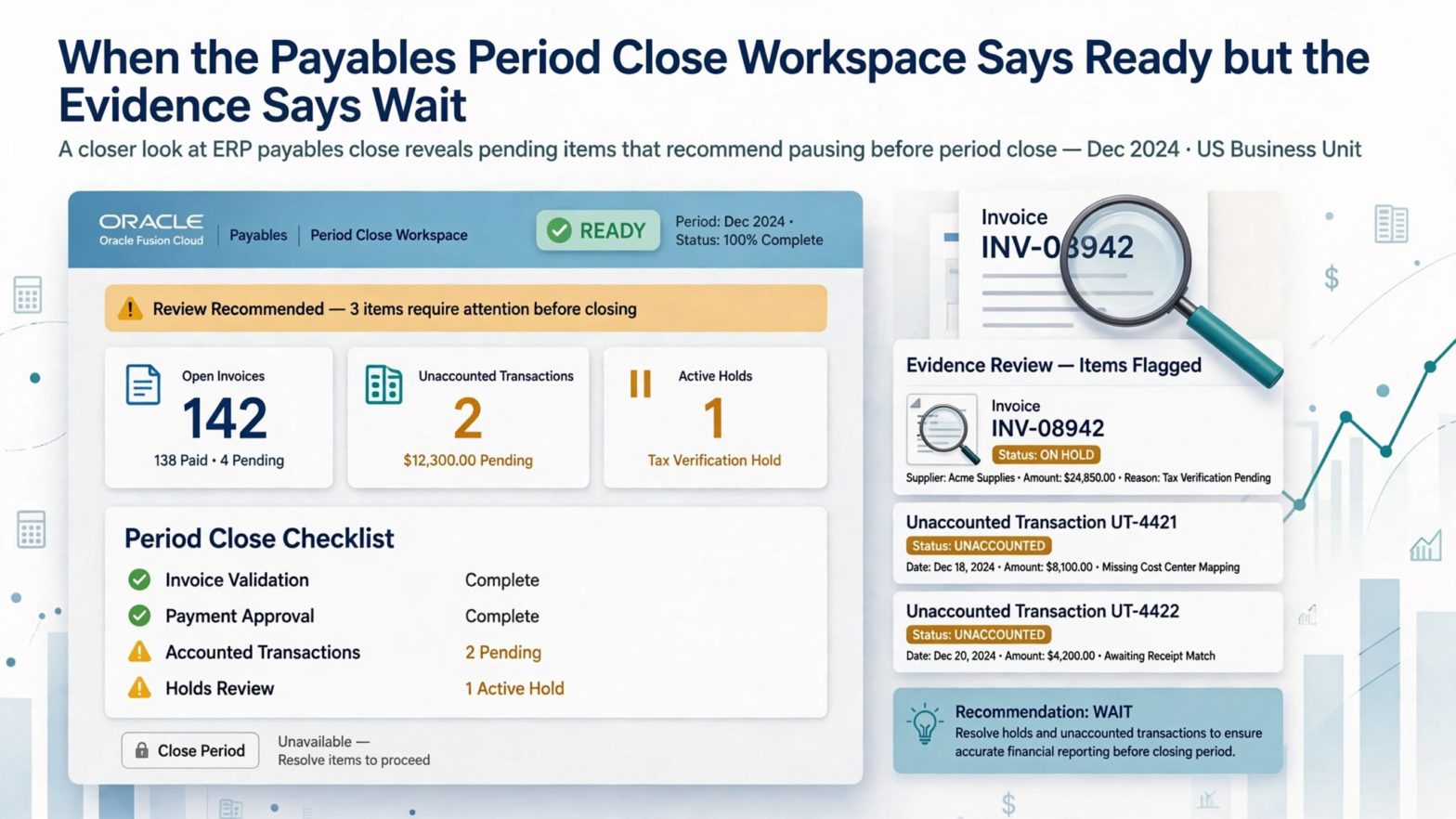
When the Payables Period Close Workspace Says Ready but the Evidence Says Wait

Introduction

It’s 7:30 p.m. on the last day of closing, and one big invoice is still red. At Tech Leads IT, we see this standoff often in Oracle Fusion Financials Training: the preparer says the next accounting run will fix it, while the controller finds no confirmation. Both read the same screen, and the real gap is that nobody defined ”ready.” 

The Payables Period Close Workspace gathers status, exceptions, and evidence in one place, but people still decide readiness. That’s why every Oracle Fusion Financials Online Training session and Oracle Fusion Financials Course should teach policy, ownership, confirmation, and sequence first. 

Oracle Fusion Financials Training Should Begin With What ”Ready” Actually Means

Most teams skip this step because it feels too basic. Then close night arrives and everyone discovers they’ve been carrying different definitions in their heads.

Before you look at a single indicator, get a few things settled. Which ledger and which period are you closing? What has to finish upstream? How big does an item have to be before it matters? What exceptions are you willing to live with? Who confirms, and who has the authority to actually close?

Without answers, you get exactly the argument from our opening scene. One person treats a scheduled process as finished. Another won’t count anything until accounting has run and transferred successfully. Neither is wrong. The rule just doesn’t exist yet, and close night is a painful time to discover that.

Write the rules as decisions, not good intentions. ”Material invoices must be validated and accounted.” ”Payment batches released before cutoff must reach their final approved state.” ”Small unaccounted items can be swept forward, but only under the named procedure.” ”Every open exception needs an owner and a written outcome.” Once it’s written that way, a colored indicator turns into something you can actually test. It also stops people from quietly bending the definition when the clock starts to bite.

Any Oracle Fusion Financials Training worth its time should drill this first, before it teaches a single screen.

A Green Summary Isn’t the Same as Proof

The workspace shows you a close posture, which is a rolled-up picture of invoice, payment, and period status for the ledger and period you picked. Underneath that picture sits the real stuff: the transaction’s state, the process output, the reason for the exception, the threshold in your policy, whoever owns it, and the confirmation.

It’s easy to read the summary and stop there. Say it shows ninety-nine items done and one exception. That feels like ninety-nine percent ready. It isn’t, because risk doesn’t spread evenly across rows. If that one exception is our corrected invoice and it’s large, it could outweigh everything else on the page.

The Oracle Financials 26D release describes the workspace as a governed space built around your approved standard operating procedures. It collects related exceptions and business evidence in one spot, but it doesn’t take away the need for someone to review and answer for the decision. So use it to get from signal to proof quickly. Open the item that matters. Figure out why it affects closets. Check the suggested action against your policy. Then write down whether a person needs to confirm it or escalate it.

Chasing the Corrected Invoice to Its Accounting Outcome

Back to our invoice. Start by rebuilding the story in order. What did validation say originally? What changed in the distribution? What’s the validation status now? What’s the accounting date, and what’s the accounting status? What did the accounting process actually output?

Here’s the trap. A correction made after a successful run isn’t covered by that run, even though the invoice looked complete at the time. The only question that matters is whether the current version of this invoice has produced the accounting you need, in the right period, in a form the ledger process can pick up. If the answer is anything softer than yes, it’s still a blocker.

Then ask whose period this belongs to. If the accounting date falls in the current period, sweeping it forward might break your policy even if the system lets you do it. If the amount is under your threshold and the procedure allows a sweep, fine, but keep the paper trail: the threshold comparison, the owner’s approval, the target period, and the effect on reconciliation.

Please don’t sweep something just to make the exception disappear. A sweep changes timing, and you should be able to explain it as carefully as any other close decision.

What Oracle Fusion Financials Online Training Can Teach About Recommended Actions

When hundreds of small warnings compete with a few real problems, prioritized recommendations are a relief. They tell you where to look first. That’s all they do. A recommendation isn’t permission.

Before you confirm anything the workspace suggests, check a few things yourself. Does the action cover the right transactions? What accounting effect should it have? What needs to be true before you run it? Can you undo it if it goes wrong? A suggestion to run a process is only useful if the parameters include the right business units and the right dates. A suggestion to move the close forward only makes sense once every mandatory gate has solid backing.

A habit I like, and one that Oracle Fusion Financials Online Training can build into learners early, is a short confirmation note with four parts: what you saw, what rule applies, what you decided to do, and what evidence you expect afterward.

For our invoice it might read: ”The corrected material invoice is still unaccounted. Policy requires current-period accounting. The owner will rerun accounting for a limited set of transactions. Successful process output and the transaction status will show it worked.”

That’s quick to write when you’re tired, and clear enough for someone who wasn’t there to follow it a month later.

Getting the Order of Period Actions Right

Opening the next period, sweeping eligible transactions, and closing the current period sound like cousins. They aren’t interchangeable. Opening the next period keeps work moving, but it doesn’t vouch for the current one. A sweep moves eligible items without resolving every exception. And closing should only happen once the prerequisites and confirmations are truly done.

Sketch a simple sequence map before close night. Mark what can run side by side and what has to wait for something else. It sounds fussy, but it keeps the next available button from becoming an accidental approval.

Plan for things going wrong too. If the accounting run for your limited set fails, the item stays a blocker and goes back to its owner with the process output. If it succeeds but the invoice still looks off, reconcile what the run picked up against the invoice before you move on. And if the close action itself fails, keep your pre-close evidence and look into the period’s condition. Clicking again and hoping isn’t a plan, and it muddies the timeline that auditors will want to reconstruct later.

Every Oracle Fusion Financials Course Needs a Close Drill That Fights Back

The best way to get a team good at close is to rehearse it with messy data. Clean practice transactions teach people very little.

Build a drill with a few awkward pieces. A high-value invoice that was corrected after validation. A small unaccounted invoice that qualifies for a sweep. A payment waiting on a final confirmation. A completed process whose parameters quietly left out one business unit. And an exception that nobody owns.

Then ask the team to rank the work, name the blockers, suggest actions, and say what evidence they’d want before confirming anything. You’ll learn fast whether people understand materiality and scope or just follow whatever looks loudest on the screen. A good Oracle Fusion Financials Course gives learners this kind of practice, because it’s the closest thing to real close night you can safely simulate.

When you review the drill, don’t grade it on speed. Look at the thinking. Did they pick the right ledger and period? Did they separate the number of transactions from the money at stake? Could they connect each recommendation to a procedure? Did they stop and hand off when the decision needed a person? And could someone else reach the same conclusion using only the saved evidence?

Speed matters at close, sure. But if a second person can reproduce the decision from the notes alone, that’s the better sign your faster process is still under control.

Wrapping Up

The Payables Period Close Workspace brings the exceptions, evidence, and next steps into one place, but it only earns trust when your team has agreed on what counts as material, who owns what, and who can say yes. That’s the lesson any good Oracle Fusion Financials Training should leave you with.

For our corrected invoice, the path is simple: prove the accounting outcome, apply the approved timing rule, confirm one action, and keep the evidence. Whether you learn it through Oracle Fusion Financials Online Training or an Oracle Fusion Financials Course, call the period ready only when the evidence backs it up.